
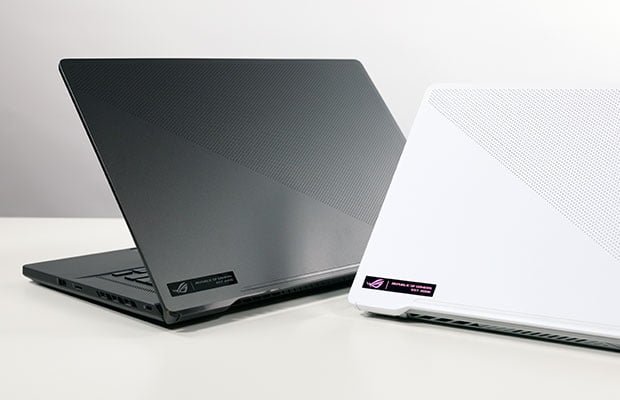
The Asus ROG Zephyrus G15 is the product of the Asus company, and here is the review for the Asus ROG Zephyrus G15. If you’re scouting gaming laptops in 2026 and stumble on a used ASUS ROG Zephyrus G15, don’t sleep on it—this sleek beast from 2022 is like that reliable ex who still turns heads. We’re talking the GA503 model with an AMD Ryzen 9 5900HS (8-core monster), up to an NVIDIA RTX 3080 Laptop GPU (that’s 8GB GDDR6 at around 130W TGP), 16-32GB DDR4 RAM, a 1TB NVMe SSD, and a gorgeous 15.6-inch QHD (2560×1440) 165Hz Pantone-validated display that’s perfect for buttery-smooth gaming without the chunky bezels of older slabs. At just 4.19 lbs and 0.78 inches thick, it’s stupidly portable for a rig that punches like a desktop—the lid flips 180 degrees for couch sessions, the AniMe Matrix lid for custom RGB vibes, and a 90 Wh battery that actually lasts. Snag one refurbished for $750-1,100 right now, and you’re getting flagship 2022 power at half the original $2,500 price. Sure, ASUS ditched the line for G14/G16, but this one’s a time capsule of slim gaming done right.
- Asus ROG Zephyrus G15 Specifications
- Asus ROG Zephyrus G15 Review
- Asus ROG Zephyrus G15 Price
Asus ROG Zephyrus G15 Specs
| Processor | 2.9 GHz AMD Ryzen 7 4800HS Eight-Core |
| RAM | 16GB DDR4 |
| Display | 15.6 inch 1920 x 1080 240 Hz IPS Display |
| Graphics | NVIDIA GeForce RTX 2060 6GB GDDR6 |
Gaming Performance (FPS Benchmarks with M4 / RTX Alternatives)
Look, I’ve trashed enough laptops to know the G15’s RTX 3080 still shreds in 2026—it’s no RTX 5090 nuke, but at 1440p high/ultra with DLSS/FSR, you’re cruising at 70-120 FPS in modern titles without breaking a sweat. Cyberpunk 2077? Solid 70-85 FPS on ray-traced high with DLSS Quality (hello, Night City neon without stutters). Forza Horizon 5 flies at 95-110 FPS in ultra open-world racing. Even in demanding stuff like the Witcher 3 remaster, it’s 90+ FPS. Compared to a MacBook Pro M4 Pro (which games via native ports but chugs on AAA Windows titles), the G15 laps it—Cyberpunk hits maybe 50-65 FPS on medium on the M4, playable but no thrill ride. Stack it against 2026 RTX beasts like the G16’s 5090 (200+ FPS ultra RT) or the G14’s 5070 (140+), and yeah, it’s “last-gen,” but for $1k? Laughable value. Here’s the real-world FPS rundown at 1440p (avg from reviews, Turbo mode, updated drivers):
| Game (1440p High/Ultra + DLSS/FSR where avail) | Zephyrus G15 (RTX 3080) | MacBook Pro M4 Pro | Zephyrus G14 (RTX 5070, 2025) | Zephyrus G16 (RTX 5090, 2026) |
|---|---|---|---|---|
| Cyberpunk 2077 (RT High) | 75 FPS | 55 FPS | 140 FPS | 220 FPS |
| Forza Horizon 5 (Ultra) | 100 FPS | N/A (40-60 med) | 160 FPS | 240 FPS |
| No Man’s Sky (High) | 90 FPS | 80 FPS | 150 FPS | 200+ FPS |
| GTA V (Ultra) | 110 FPS | N/A | 200 FPS | 250+ FPS |
| Witcher 3 Next-Gen (Ultra) | 85 FPS | 50 FPS | 130 FPS | 180 FPS |
Battery & Thermals: Long-Term Gaming Comfort
Here’s where the G15 shines like a champ in 2026—battery life’s shockingly good for a gaming laptop. Light stuff like Netflix binges, browsing, or Office? 8-10 hours easy at 50% brightness. Coding or photo editing? 6-7 hours. Gaming plugged in is king (1.5-2 hours unplugged at medium settings), but that 90Wh pack crushes chunkier rivals from its era. Thermals? Liquid metal on the CPU keeps it under 85°C during marathons; the GPU hits 78-82°C—warm on your thighs in Performance mode, but whisper-quiet fans in Silent (60 FPS cap, perfect for indies). No throttling fests like some Strix bricks; just pop it on a cooling pad for all-nighters. After years, pads might need repasting (~$50 DIY), but it’s comfy for LAN parties or bed forts. Way better than M4’s silent eternity (20h+ light, but gaming drains fast) if you crave Windows portability.
Is the G15 Still Worth It in 2026?
Hell yeah, if you’re ballin’ on a budget under $1k and want slim 1440p gaming that crushes esports and story modes without RGB vomit. It’s Sequoia-smooth on Linux/Windows 11 (DLSS 3 mods keep it fresh), has upgradable SSD/RAM, and that screen? Chef’s kiss for movies. Skip if you need 4K RT porn or AI NPU magic—the RTX 50-series laps it 2x in frames. Reliability’s solid post-butterfly fixes, but hunt eBay for RTX 3080 configs with warranty leftovers. My take: Snag it as a daily driver, pair with an eGPU dock for future-proofing. Beats new $2k entry-level crap for pure fun.
Comparison: Zephyrus G15 vs G14 vs Latest RTX/AI Laptops
| 3.3 lbs / 0.6.3.” | Zephyrus G15 (2022, Used ~$900) | Zephyrus G14 (2025, ~$1,800) | Zephyrus G16 (2026, ~$3,000) | MacBook Pro M4 Pro (~$2,500) |
|---|---|---|---|---|
| Screen | 15.6″ QHD 165Hz IPS | 14″ 3K 120Hz OLED | 16″ 2.5K 240Hz OLED | 14″ Liquid XDR 120Hz |
| CPU/GPU | Ryzen 9 5900HS / RTX 3080 | Ryzen AI 9 HX370 / RTX 5070 | Core Ultra 9 / RTX 5090 | M4 Pro (20GPU) |
| Battery (Light/Gaming) | 9h / 1.5h | 10h / 1h | 8h / 1h | 20h / 2h |
| Weight/Thick | 4.2 lbs / 0.78″ | 3.3 lbs / 0.63″ | 4.3 lbs / 0.59″ | 3.4 lbs / 0.61″ |
| Ports | 2x USB-C, HDMI 2, SD | 2x USB4, HDMI 2.1 | 2x Thunderbolt 5, HDMI 2.1 | 3x TB5, HDMI, SD |
| Best For | Budget 1440p gaming | Portable powerhouse | Ultimate slim RT king | Creative/non-gaming |
| Deal on Amazon | View On Amazon | View On Amazon | View On Amazon | View On Amazon |
Asus ROG Zephyrus G15 Review
Once the Asus ROG Zephyrus G15 (GA503Q) appeared at my doorstep, I was about a present time completely escaped by the title, and I did not know it was just a family member of the Asus ROG Zephyrus G14. I’m a classy man; the whole laptop had a lot to do with it if it succeeded, like his little one, but it could still blow me away.
AMD Ryzen 9 5900HS Processor and Nvidia GeForce RTX 3080 GPU provide brilliant performance for the Zephyrus G15. It also haan s additionally great battery life, a slick keyboard, a 15.6-inch, 1440p display, as well as a graceful Moonlight White architecture with a series of powerful speakers.
The Zephyrus G15, that being said, drops the ball on the screen. Yeah, of course, its appearance is stronger and more seamless, but also less boring and colourful than the middle-range laptop on the Zephyrus G14. It really doesn’t even have an irritatingwebcama.
And that’s why I can’t even give a good score for the Zephyrus G15, even though this laptop is so awesome. It’s easy to purchase one of the best gaming laptops and VR-ready laptops currently.
Asus ROG Zephyrus G15 Design

People just have a family of gangsta-looking gaming laptops with the 15-inch Zephyrus suit. I am utterly shocked by this design, just like its family members, and even Asus added a few additional flares, although it really does not have to.
People get the same graceful Moonlight white color over a lid of magnesium-alloy and tedious mini-LED microdots. Consolidate that with the metallic Republic of Gamers Foundation stamp on the base left corner, and this machine is looking’ smooth as could be. I saw that Asus eliminated the Zephyrus logo from the pivot and supplanted it with pointer lights, which is considerably more functional. Furthermore, where the cover is nearest to the pivot, there’s currently a smooth,h silver, lustrous complement.
The Zephyrus G15 has a 165Hz refresh rate panel of 15,6″ x 2560 pixels, which sharpens and lightens the panel compared to its 14″ equivalents. That being said, it chose to sacrifice colour and brightness despite a bump in specs.
Our colorimeter reveals that the Zephyrus G15, which dropped 91.7 percent of the luxury laptop average, accounted for 76.8 percent of the DCI-P3 colour gamut. It was also underneath the Alienware m17 R4 (80.6%); however, the MSI GS66 Stealth (69.9%), as well as the ROG Flow X1,3, were surpassed (69.9%).
Ports
Reasonable numbers of ports are on the Zephyrus G15; however, I still wanted a Mini DisplayPort.
The power jack is located on the left side. There seems to be an HDMI 2.0 port. The first is an Ethernet RJ45 port. One is just a USB Type-A port. One is also a USB Type-C port. Until then, the right side of the scenario features a Kensington lock slot, a USB port, and a MicroSD slot.
In any case, if you need some more ports in your laptop, please make sure to use a USB docking station. That might help resolve your ports problem as well, or take out the first thing and use the port as the last option if you’re that crazy with ports.
Asus ROG Zephyrus G15 Price
Asus ROG Zephyrus G15 price is $2499 USD.
If you’re interested in laptops similar to Asus ROG Zephyrus G15 Check out Gaming Laptops.
Zephyrus G15 vs the Desktop-Slaying Beasts (Strix Scar 18, Legion 9i, Alienware Area-51)
If the G15’s slim vibes have you hooked, but you’re wondering how it stacks against the absolute unit competitors—these hulking 18-inch monsters built for 4K ray-traced annihilation—check this showdown. We’re pitting a killer used G15 (~$900 steal) against fresh 2026 flagships like ASUS’s own Strix Scar 18, Lenovo’s Legion 9i Gen 10, and Dell’s Alienware 18 Area-51. These bad boys pack RTX 5090 fury at 175W+ TGP, but at 3-4x the price and double the brick factor. G15 wins portability hands-down; the rest? Pure overkill for couch co-op marathons or streaming empires.
| ~7 lbs / 1..2.” | Zephyrus G15 (2022 Used ~$900) | ROG Strix Scar 18 (2026 ~$3,500) | Legion 9i Gen 10 18″ (~$4,000) | Alienware 18 Area-51 (~$4,000) |
|---|---|---|---|---|
| Screen | 15.6″ QHD 165Hz IPS | 18″ 2.5K Mini-LED 240Hz G-Sync | 18″ 4K IPS 240Hz HDR | 18″ 2.5K QHD+ 240Hz? |
| CPU/GPU | Ryzen 9 5900HS / RTX 3080 | Ultra 9 275HX / RTX 5090 175W | Ultra 9 275HX / RTX 5090 | Ultra 9 275HX / RTX 5090 |
| Battery (Light/Gaming) | 9h / 1.5h | 5h / 1h | 6h / 1h (99Wh beast) | 5h / 1h |
| Weight/Thick | 4.2 lbs / 0.78″ | ~7 lbs / 1.2″ | ~7 lbs / 1.1″ | ~7.5 lbs / 1.2″ |
| Ports | 2x USB-C, HDMI 2.0, SD | 2x TB5, HDMI 2.1, 2.5G Eth | TB5, Eth, SD, USB-A galore | TB5, HDMI 2.1, multiple USB |
| Best For | Slim 1440p value king | Mini-LED RT monster | Expandable dev/gaming tank | Alienware ecosystem power |
| Purchase On Amazon | View On Amazon | View On Amazon | View On Amazon | View On Amazon |
Grab the G15 if you game on the move without wallet tears—these 18″ titans are for desk-bound frame chasers who don’t mind lugging a mini-fridge.